Screenshots


Introduction
The CleverType AI Keyboard is a revolutionary Android application that redefines the way users interact with their devices through typing. Developed by CleverType Keyboard, this app incorporates advanced AI features designed to enhance your writing experience significantly. With capabilities ranging from grammar correction to tone adjustment, paraphrasing, translation, and even direct access to ChatGPT, CleverType is tailored for anyone seeking a powerful writing assistant right at their fingertips. Whether you're drafting an email, crafting a social media post, or simply texting friends, CleverType ensures your communication is polished, precise, and contextually appropriate.
Graphics & Gameplay
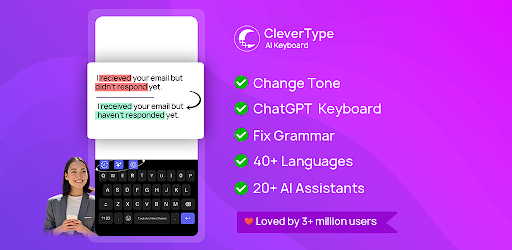
The graphical interface of the CleverType AI Keyboard is both modern and intuitive. The keyboard layout is user-friendly, striking a balance between functionality and aesthetics. The screenshots reveal a vibrant design with customizable themes, allowing users to tailor the keyboard to their personal style. The keys are spacious, and the overall design promotes smooth and efficient typing. Icons representing various AI features are neatly integrated into the layout, making it easy for users to access tools like grammar correction and paraphrasing without any hassle.
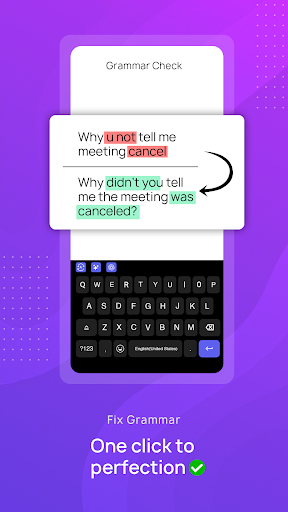
One notable screenshot showcases the keyboard in action, demonstrating the AI grammar correction feature. As users type, the app seamlessly highlights errors and suggests corrections, which enhances the overall user experience. Other visuals illustrate the theme customization options, showcasing a variety of vibrant colors and designs that users can choose from, adding a personal touch to their keyboard.
Key Features
- Smart Grammar Correction & Spell Check: Instantly fix grammar and spelling errors in real-time across 40+ languages, making it ideal for multilingual users.
- AI Paraphrasing & Rephrase Tools: Easily rephrase sentences to adjust tone, enabling users to write in a professional, casual, funny, or formal manner, perfect for any context.
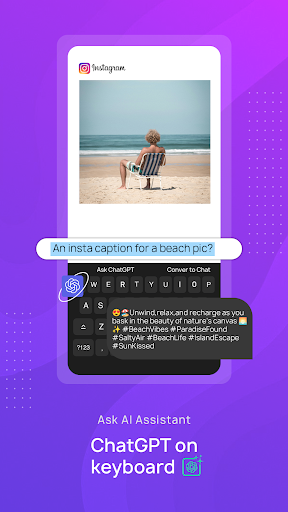
- ChatGPT Keyboard Access: Direct integration with ChatGPT allows for quick assistance while typing, making it easier to get answers or suggestions without leaving your current app.
- Instant AI Reply & Email Writing: The AI analyzes previous messages to generate contextually relevant replies for various messaging platforms, enhancing communication efficiency.
- AI Translation in 40+ Languages: This feature allows users to translate text while typing, maintaining natural tone and context, which is excellent for multilingual conversations.
- Advanced Writing Support: Includes tools for punctuation correction, vocabulary enhancement, and proofreading, serving as a comprehensive writing companion.
- Customizable Theme Options: Users can personalize their keyboard with various themes, colors, and layouts, ensuring a unique typing experience.
- Fast Performance: The keyboard is designed for speed and efficiency, with regular updates to improve functionality and performance.
- Multiple Keyboard Options: Adaptable to various needs, including standard English typing, an iOS keyboard alternative, or a dyslexia-friendly keyboard.
- Privacy Protection: User data remains secure, with a commitment to not track or save typing information.
Mod Features
While the CleverType AI Keyboard is free to download and use, there are several hypothetical mod features that could enhance the user experience:
- Premium Unlocked: Access to all advanced AI features without the need for a subscription, allowing users to fully utilize the keyboard's potential.
- No Ads: Enjoy an uninterrupted typing experience with the removal of all advertisements, ensuring a seamless workflow.
- Unlimited Money: Users could hypothetically have unlimited access to premium themes and customization options without any additional costs, allowing for complete personalization.
- Enhanced AI Capabilities: Access to advanced AI tools, such as a more sophisticated paraphraser or specialized writing assistants for different contexts.
How to Install APK on Android
Installing the CleverType AI Keyboard APK is a straightforward process. Follow these steps to ensure a smooth installation:
- Download the CleverType AI Keyboard APK from a trusted source (like the original URL provided).
- Before installing, ensure that your device allows installations from unknown sources. Go to Settings > Security > Install unknown apps, and enable it for the app you will use to download the APK (like your browser).
- Locate the downloaded APK file in your device's file manager or download folder.
- Tap on the APK file, and you will see an installation prompt. Click Install.
- Once installed, open the app and follow any on-screen instructions to set up the CleverType AI Keyboard as your default keyboard.
- Grant necessary permissions for the keyboard to function optimally, such as accessibility and full access to use AI features.
Call to Action
If you're looking to elevate your typing experience and gain access to powerful AI writing tools right on your keyboard, look no further than the CleverType AI Keyboard. Download it now and transform the way you communicate! Download CleverType AI Keyboard